
Key Takeaways:
Your technicians may be spending one to two hours of every paid day behind the wheel instead of treating accounts. That windshield time is the single largest controllable cost in a route-based pest control operation, and most of it is a planning problem rather than a driving problem.
- Optimization is not the same as planning: planning decides which stops happen, while optimization arranges them in the single most efficient order across distance, traffic, service time, technician skills and customer time windows. A basic map app cannot do the second one.
- Pest control feels bad routing harder than most trades: a dozen or more recurring stops a day means a few wasted minutes between each one compounds into hours of lost capacity every cycle, not once.
- The payback shows up as capacity, not just fuel: operators commonly cite 20 to 40 percent lower fuel and mileage costs, but the bigger number is two or more extra billable jobs per technician per day, which is revenue gained without hiring.
- Four tactics do most of the work: cluster jobs by neighborhood, give technicians consistent territories, put recurring customers on the same day each cycle and let software sequence the stops.
- PestPac's RouteOp optimizes a full month of routes around your business rules, while Best Fit drops inbound calls into the most efficient open slot in real time. See how pest control routing software handles workday calendars, technician skill types and customer time windows.
How much of your technicians' day is currently going to drive time rather than billable work? Model your own numbers with the pest control ROI calculator, or talk through your routes with our team.
What Pest Control Route Planning Is and What It Means to Optimize It
Pest control route planning is the process of deciding which jobs each technician will complete, in what order and on which day. Every pest control business does this in some form: on a whiteboard, in a scheduling book, in a spreadsheet or in dedicated software.
What Is Pest Control Route Planning, and How Does It Differ From Route Optimization?
Route planning is deciding which stops happen and in roughly what order; route optimization is the step beyond that, arranging those stops in the most efficient possible sequence. Planning answers "who do we visit and when." Optimization answers "what is the single best order and assignment so we drive the least, serve the most and honor every constraint." In practice, planning can be done by hand for a small book of business, while true optimization across dozens of daily stops and hundreds of recurring accounts is effectively impossible to do well without software.
What Is Pest Control Route Optimization?
Pest control route optimization is the practice of sequencing and scheduling service stops so technicians drive the shortest sensible path, waste the least time and complete the most jobs in a day. Rather than listing stops in the order they were booked, optimization weighs travel distance, traffic, service time, technician skills, customer time windows and other business rules all at once to produce the most efficient plan.
What Is Pest Routing Software or Field Service Management Software?
Pest routing software is a specialized tool that automatically organizes daily service schedules to minimize drive time, reduce fuel costs and maximize the number of accounts a technician can service. Field service management (FSM) software is the broader category it usually sits inside: a single platform that combines routing with scheduling, customer records, mobile field tools, billing and reporting. The distinction matters, because a standalone routing tool only sequences stops, while an FSM platform connects routing to the rest of your operation so data flows automatically between the office, the field and your invoicing.
The Key Terms: Windshield Time, Route Density, Smart Routing and Clustering
A handful of terms come up constantly in routing conversations. Here is what each one means in plain language.
What Is "Windshield Time" and Why Does It Matter?
Windshield time is the time technicians spend driving between jobs rather than performing them, paid hours that generate no revenue. It matters because it is one of the largest controllable costs in pest control: every minute a technician spends behind the wheel is a minute they are not treating an account, and across a high-volume day those minutes add up to real lost capacity, fuel spend and overtime. Reducing windshield time is the single clearest goal of route optimization, with well-run software capable of cutting it substantially.
What Is Route Density?
Route density is how many of your accounts sit close together within a given area. High density means more jobs per square mile, which means less driving between them. Dense routes lower fuel and labor costs, let technicians complete more stops per day and make it easier to slot in an emergency call because a technician is usually nearby. Density is also a growth metric, something to build deliberately over time rather than a number you set once.
What Is Smart Routing or Dynamic Routing?
Smart or dynamic routing uses an algorithm to build and adjust the optimal stop order automatically, accounting for real-world conditions rather than straight-line distance. Where static planning fixes a route and leaves it, dynamic routing factors in traffic, weather, road closures, technician availability and job priorities, and it can re-optimize when something changes during the day. For pest control operations with recurring schedules and the occasional emergency callout, dynamic routing is almost always the better fit.
What Is Geographic Clustering?
Geographic clustering is the practice of grouping nearby appointments together so technicians serve one neighborhood or zone at a time instead of crossing town between jobs. It is the most cited practical strategy in route efficiency for a reason: clustering is the foundation that route density, predictable scheduling and reduced windshield time all build on.

Why Route Optimization Matters for Pest Control Businesses
Every service business cares about drive time, but pest control feels it more sharply than most. The reason is structural: pest control work is high-volume and overwhelmingly recurring.
A plumber or HVAC technician might complete three or four longer jobs in a day, so driving is a small fraction of the schedule. A pest control technician might hit a dozen or more accounts in a single day, week after week, on a recurring cycle. Each additional stop is another drive, another arrival, another few minutes of transit, and because the work repeats, an inefficient route is not a one-time cost but a tax you pay every cycle. Drive time does not just add up, it compounds.
That structure cuts both ways. Because there are so many stops, even small improvements in sequencing produce outsized gains. Tightening a route by a few minutes per stop can free up enough time to add jobs without extending the workday.
Why Is Manual Scheduling No Longer Viable for Modern Pest Control Operations?
Manual scheduling breaks down because the math outgrows human capacity fast. Juggling hundreds or thousands of recurring accounts, each with its own frequency, service type, technician skill requirement and customer preference, while also honoring time windows and slotting in emergencies, is more than a whiteboard or scheduling book can handle. PestPac estimates that a single technician's 10 daily appointments can be arranged in roughly 3.7 million possible route variations, and a person simply cannot evaluate those by hand. The result of trying is wasted miles, human error, missed appointments and weeks of office time spent planning the next cycle.
The contrast between the two approaches shows up clearly across every part of the operation:
Why Do Rising Fuel and Labor Costs Make Routing Optimization More Urgent?
Because routing is where fuel and labor costs concentrate. When fuel prices climb, every unnecessary mile costs more; when wages rise, every hour of windshield time and every hour of overtime spent finishing a poorly planned day costs more. Optimization attacks both at once, with fewer miles driven and more jobs completed inside the standard workday, which is exactly why tightening routes becomes more valuable as margins tighten.
The main benefits of getting routing right include:
- Lower fuel and vehicle costs. Fewer miles driven means less fuel burned and less wear on the fleet.
- More billable work per technician. Time saved on the road becomes time available for revenue-generating stops.
- Less overtime. Tighter routes mean technicians finish inside the standard workday instead of running late.
- More reliable service. Logical routes make arrival times predictable, which improves on-time performance and customer trust.
- Less administrative strain. Automated, repeatable routes remove the multi-week scramble of building schedules by hand.
- Room to grow without growing overhead. Tighter routes let you take on more customers using the technicians and vans you already have.
- Higher customer retention and fewer cancellations. When technicians arrive on time and service windows are consistent, customers renew agreements at higher rates and are less likely to cancel. Reliable scheduling is one of the clearest drivers of long-term service agreement retention.
Customer retention is worth calling out as a distinct benefit, not just a side effect. Pest control is a relationship business built on recurring agreements, and customers cancel for a small number of predictable reasons: the technician was late, the service window kept shifting, or they simply lost confidence that the schedule would hold. Route optimization addresses all three directly. When stops are sequenced logically and technicians are not scrambling to make up time from a poor route earlier in the day, arrival windows become reliable. When recurring customers are placed on the same day each cycle, the schedule becomes something they can count on. That consistency is what turns a one-year customer into a multi-year customer. Businesses that track their cancellation data often find that service reliability complaints cluster around routes that were overloaded or poorly sequenced, the same problems that efficient routing fixes. Tighter routes do not just add jobs to the day, they protect the ones you already have.
What Inefficient Routing Actually Costs
Inefficient routing costs you in five places at once: wasted fuel, technician overtime, lost job capacity, hours of office staff time spent planning, and, most expensively over the long run, customer churn when service slips. Most guides assert that routing saves money, but it is far more persuasive to put numbers to your own operation.
How Much Can Route Optimization Reduce Fuel Costs?
Reductions of roughly 20 to 40 percent in fuel and mileage-related costs are commonly cited across the industry, depending on your current route density, service-area geography and how loose your routes are today. Fuel is one of the largest line items in any field service fleet, so even the low end of that range translates into meaningful savings, and the savings compound with every technician and every recurring cycle.
How Many More Jobs Per Day Can Technicians Complete With Optimized Routes?
Most pest control businesses gain two or more additional jobs per technician per day after optimizing their routes, with no new hires and no new vans. At scale, that is hundreds of additional appointments per month. The gain comes purely from eliminating backtracking and shrinking the time between stops, which is why added daily capacity is usually the single biggest driver of routing ROI.
What Is the Measurable ROI of Implementing Routing Software?
The clearest way to size your own return is to combine the two effects above, fuel saved plus jobs added, across your whole team. As a simple frame: if optimization adds even two jobs per technician per day at your average ticket, multiply that by your technician count and your working days per year, then add your projected fuel saving. Prefer to skip the manual math? Use the pest control ROI calculator to model your own numbers.
Note for multi-branch and enterprise operations: these figures scale with technician count, so the dollar impact of routing is largest precisely where it is hardest to manage by hand. For operations growing through acquisition, standardizing routing across newly acquired branches is one of the fastest sources of post-merger efficiency, and one of the areas where a purpose-built platform pays off most.
Common Routing Mistakes and How to Avoid Them
Even businesses that invest in software can undercut their own results. These are the mistakes that come up most often, with a fix for each.
Optimizing only for distance. The shortest path on a map is not always the most profitable route. A truly optimized route also accounts for service time, traffic at the hour you actually drive, technician certifications and customer time windows. Fix: choose a system that weighs business rules, not just mileage.
Working from bad or outdated data. Wrong addresses, mismeasured jobs and missing service-time estimates all break an otherwise good route. Garbage in, garbage out. Fix: clean your customer data before you optimize, and keep addresses and service-time estimates current.
Scheduling without geographic logic. Booking customers by the date they called rather than by where they live scatters technicians across town. Fix: cluster recurring accounts by neighborhood and assign them to consistent days.
Leaving no buffer for the unexpected. Packing routes wall-to-wall means one long job or one emergency cascades into a day of late arrivals. Fix: build modest buffers between stops (more on this below).
Treating routing as a one-time setup. Routes drift as customers come and go and seasons change. Fix: review route data on a regular cadence and re-optimize, rather than setting routes once and forgetting them.

How to Optimize Your Pest Control Route Planning: 9 Practical Steps
This is the heart of the guide. The following steps work whether you build routes by hand or use software, though good software automates most of them.
1. Group Jobs by Neighborhood (Geographic Clustering)
Group nearby appointments so technicians serve one area at a time instead of crossing town between stops. Geographic clustering is the foundational tactic of efficient routing: it keeps stops close together so technicians drive short hops, which directly cuts windshield time and fuel use. Everything else in this list builds on it.
2. Build Consistent Technician Territories
Assign each technician a stable service area rather than sending crews wherever the next job lands. Consistent territories build route density, deepen technicians' familiarity with the area and let the same technician build a relationship with the same customers over time, which improves both efficiency and retention.
3. Schedule Based on Service Type
Different work has different rhythms: one-time inspections, recurring residential treatments and commercial accounts each behave differently. Group and sequence them deliberately, for example by batching recurring treatments in an area on a set day while leaving room for inspections, so technician skills and equipment match the work and no one drives back and forth between mismatched job types.
4. Schedule Recurring Customers on the Same Day Each Cycle
Pest control runs on repetition, so put recurring customers in the same geographic area on the same day or week each cycle. This produces predictable, dense routes, makes arrival times easy for customers to anticipate and removes the single largest source of repetitive planning work. Set the recurrence once and let it carry forward.
5. Build Buffer Time Into the Schedule
Leave modest gaps, often 10 to 15 minutes, between certain stops so one long job or a little traffic does not cascade into a day of late arrivals. Buffer time feels like lost capacity but usually protects it, because it keeps the whole day from unraveling. This is a small, practical tactic that surprisingly few operators apply deliberately.
6. Use Anchor Appointments to Cut the Office-to-First-Job Commute
Start the day from the heart of the technician's territory rather than from the office. By anchoring the first appointment near where the cluster of work sits, or having technicians begin from home toward the territory, you eliminate a long, unbillable morning commute across town before the real work even begins.
7. Minimize Windshield Time With Smart Territory Management
Treat reducing windshield time as an explicit goal, not a side effect. Combine tight territories, dense clusters and software that sequences stops in a logical one-direction loop rather than a series of back-and-forth hops. The target most operators can realistically chase with good software is a substantial reduction in drive time as a share of the day.
8. Plan for Emergency and Same-Day Calls
Decide in advance how urgent calls get absorbed so a single emergency does not blow up the planned schedule. Practical tactics include reserving a little buffer capacity each day, using tiered response protocols and dispatching the closest qualified technician rather than whoever is free. Done well, you can offer responsive same-day service and still protect the day's planned route. There is more on the software that makes this automatic below.
9. Track and Review Route Data Every Week
At the end of each week, compare planned drive time against actual drive time and look for the stops where the plan and the ground disagree. That gap is exactly what you need to refine next week's routes. Small, regular adjustments beat occasional overhauls, and they are how you grow route density over time.
How Do You Grow Route Density Over Time as You Add Customers?
Make density a priority when you take on new business: chase new accounts in neighborhoods where you already work rather than scattered one-offs across town, and let every new customer make a route tighter rather than looser. Over time this compounds, because denser routes free up capacity, which lets you serve more customers in the same area without adding headcount. Density built deliberately is one of the clearest signs of a maturing, scalable operation.
How Do You Balance Automated Routing With Your Own Local Knowledge?
Let the software optimize the full day, then have experienced staff fine-tune the few stops where local knowledge matters: a gated community, a tricky commercial dock, an account that always runs long. The goal is for judgment to layer on top of the optimized plan rather than override it wholesale. Running the system as a guide rather than law for the first few weeks is the fastest way to find the right balance and earn technician trust.
Software and Systems: What to Look For
Once you have decided to optimize, the question becomes which tool to use. Options range from basic route-planner apps suitable for a solo operator to full field service management platforms built for multi-technician, multi-branch operations.
How Is Route Optimization Software Different From Google Maps?
A free map app navigates one driver between points and can order a short list of stops, but it cannot run a pest control business. Generic tools like Google Maps cannot account for the constraints that define the work: technician licensing and skills, recurring service patterns, customer time windows, chemical and vehicle capacity, or multiple service lines on one account. Route optimization software handles all of that automatically, sequencing dozens of stops at once and rebuilding the plan in seconds when something changes, and, in a full platform, keeping the office, the field and billing working from the same data.
Should You Use a Standalone Routing Tool or an Integrated Platform?
For most growing pest control businesses, an integrated platform beats a standalone routing tool. A standalone tool sequences stops but leaves scheduling, customer records and billing in separate systems, forcing you to maintain and reconcile multiple sets of data. An integrated platform connects routing to your CRM, mobile app and invoicing, so customer data informs routing, routing informs scheduling and field data flows back automatically. A standalone tool can make sense if you already run a CRM and billing system you are happy with and only need routing bolted on, but for everyone else, integration removes the data silos that quietly create extra work.
What Features Does the Best Pest Control Routing Software Include?
Match the tool to your business, and test it before you commit. The features that matter most are:
- Automated route optimization that sequences stops by business rules, not just distance
- Recurring service scheduling so repeat customers route consistently each cycle
- Territory and service-zone assignment
- Real-time GPS tracking and dispatch for live crew visibility and rerouting
- Real-time traffic, weather and road-closure awareness built into the routing engine
- A mobile app for technicians with job details, customer and service history, navigation, digital signatures and in-field payment capture
- CRM integration so routing pulls job details, service history and customer preferences automatically
- Automated dispatching with skill matching and proximity-based assignment, including real-time re-dispatch for emergencies
- Reporting and analytics to track drive time, jobs per day and revenue per technician
- Compliance and chemical-usage tracking, a pest-control-specific need generic field service tools often miss
- A free trial or demo so you can confirm it fits before paying
What GPS and Real-Time Tracking Features Do You Need?
At a minimum, you want live vehicle location on a map so the office can see where every technician is and reroute when conditions change. Beyond that, the features that earn their keep are real-time route updates pushed to technicians, accurate customer ETA notifications, and safety monitoring that flags speeding, hard acceleration and excess idling, which both protects your team and extends vehicle life. GPS tracking serves two audiences at once: office visibility for dispatch, and turn-by-turn navigation plus status updates for the technician in the field.
How Does Automated Dispatching Work?
Automated dispatching assigns each job to the right technician based on skills, certifications, location and availability, rather than a dispatcher matching them by hand. When an emergency or same-day call comes in, the system can slot it into the closest qualified technician's route in real time and re-optimize around it, so urgent work gets handled without manually rebuilding the day.
How Much Does Pest Control Routing Software Cost?
Pricing varies widely by the type of tool and the size of your operation. Basic standalone route-planner apps can start low on a per-user basis, while full field service management platforms that bundle routing, CRM, mobile and billing are typically priced by team size and the features you need, and quoted on request. Rather than chase the lowest sticker price, weigh cost against return: fuel saved, jobs added and admin hours eliminated. A platform that costs more but adds two or more billable jobs per technician per day usually pays for itself quickly. For a tailored figure, request a quote and run the ROI calculator.
Setting Up Correctly
Good setup makes or breaks the results. Import your customer data with accurate addresses, map your service areas and technician territories, run test routes and compare planned versus actual drive time before going fully live. Then review and refine weekly.
Compliance Tracking: Chemical Use and Treatment Records
Route planning software is often evaluated purely on whether it cuts drive time and adds jobs to the day. That is the right starting point, but it misses one of the less glamorous and more consequential capabilities a field service platform needs to handle: compliance tracking. For pest control operators, compliance is not optional paperwork. It is a legal requirement that runs alongside every service stop on every route, every day.
What Is Compliance Tracking in Pest Control?
Compliance tracking is the process of documenting every pesticide application in enough detail to satisfy federal, state and local regulatory requirements, and to demonstrate that your technicians applied the right products, at the right rates, in the right locations, for the right reasons.
At the federal level, the EPA's Federal Insecticide, Fungicide, and Rodenticide Act (FIFRA) requires that commercial pesticide applicators keep records of restricted-use pesticide (RUP) applications. Most states impose their own requirements on top of FIFRA that are typically broader, covering all commercial applications rather than just restricted-use products, and extending to general-use pesticides as well.
A complete treatment record typically needs to capture:
- Date and location of each application (address, treatment area, and GPS coordinates in some jurisdictions)
- Target pest and pest pressure observed
- Product name, EPA registration number and active ingredient
- Application rate, quantity used and dilution, for example ounces per gallon or gallons applied per 1,000 square feet
- Application method, such as spray, bait, granular or fumigation
- Technician name and license or certification number
- Weather conditions at time of application in some states
- Pre-entry intervals or re-entry intervals communicated to the customer
Records must typically be retained for a minimum of two years under federal rules, and many states require three years or longer. Commercial contracts, particularly with HOAs, property management companies, schools and food-handling facilities, frequently impose their own documentation standards on top of regulatory minimums.
What Does Non-Compliance Actually Cost a Pest Control Business?
The financial and operational consequences of inadequate recordkeeping compound quickly once regulators, customers or plaintiffs are involved.
Regulatory fines and penalties. State pesticide regulatory agencies conduct routine audits and respond to complaints. Violations such as missing records, incomplete application logs or records that cannot be produced on demand can result in fines ranging from a few hundred dollars per violation to several thousand, depending on the jurisdiction and whether the violation is a first offense or a repeat finding.
License suspension or revocation. A pest control business operates on its applicator license. Repeated or serious recordkeeping violations put that license at risk. A suspended license means no revenue. A revoked license means rebuilding from the ground up, including requalifying technicians.
Civil liability exposure. If a customer, neighboring property or third party claims harm from a pesticide application, the first question a plaintiff's attorney will ask is what you applied, when, at what rate and who applied it. A business that cannot answer those questions from its records is in a far weaker legal position than one that can produce a complete, timestamped treatment record within minutes of being asked.
Lost commercial contracts. Schools, food service facilities, healthcare sites and property management portfolios routinely require proof of compliance as a condition of the service agreement. An operator who cannot supply consistent, complete service documentation loses those accounts to competitors who can.
Cost of remediation. When an audit fails or a complaint triggers a review, the back-office time spent reconstructing incomplete records, responding to regulators and managing the dispute is unbillable hours that come directly out of margin.
Why Manual Recordkeeping No Longer Holds Up
Paper service tickets and end-of-day transcription into a spreadsheet were the standard for decades. For a two-technician operation covering a handful of accounts, the system is workable if imperfect. For any business with double-digit route capacity or aspirations to grow commercial accounts, manual compliance tracking carries risks that accumulate with every additional stop.
Transcription errors. A technician writes down the wrong EPA registration number, a rate in the wrong unit, or a product name that is abbreviated differently from the label. The record is technically present but inaccurate, and therefore useless in an audit or legal dispute.
Lost or illegible paperwork. Paper left in a vehicle overnight, damaged by weather or simply misplaced creates gaps in records that are impossible to reconstruct accurately after the fact.
No enforcement at point of service. A paper form cannot force a technician to complete every required field before leaving a property. A platform can. Required fields left blank on paper are only discovered back in the office, often days later.
Time cost. Re-entering field data into a back-office system is overhead that adds no value and introduces a second opportunity for error. It also means office staff cannot pull a treatment record instantly if a customer or regulator calls, because they have to wait for the paper to come in and be filed.
No audit-ready retrieval. When an inspector arrives or a commercial client requests documentation for the past 12 months of service, finding, collating and presenting paper records from dozens of jobs across multiple technicians is a significant time investment. The time spent is unpaid.
How Route Planning and Field Service Software Handles Compliance Automatically
Integrated field service management platforms shift compliance tracking from a separate administrative task into something that happens as part of the job itself. The key differences:
Capture at the point of service. Technicians record the products applied, quantities, application method and other required fields on their mobile device before they leave the property. The record is timestamped and geotagged automatically, with no transcription required and no end-of-day data entry.
Required field enforcement. The platform can prevent a technician from closing out a job order without completing mandatory compliance fields. Non-compliance becomes structurally difficult, rather than relying on individual discipline.
Pre-loaded product library. A chemical product library built into the platform means technicians select the product from a pre-configured list rather than hand-writing EPA numbers and application rates. Labels, safety data sheets and application rate guidance are available at the point of selection, reducing the risk of using an incorrect rate.
Automatic calculation of quantities applied. When a treatment area is entered, the platform can calculate and record the quantity of product used based on the configured application rate, removing a common source of arithmetic errors in manual records.
Instant retrieval. Every treatment record is stored against the customer account and searchable by technician, product, date range or address. Pulling a 24-month chemical use history for an audit or a commercial client's documentation request takes minutes, not hours.
Customer documentation generated automatically. Service tickets and treatment certificates with the required compliance information are generated from the same data, ensuring the customer's copy and the operator's internal record are consistent.
Chemical inventory tracking. Usage data captured across every job feeds into inventory tracking, giving operations managers visibility into which products are being used at what rate, supporting both ordering decisions and internal audits.
How PestPac Handles Compliance Tracking
PestPac's compliance tracking is built into the same workflow technicians use to complete every service stop, so it runs alongside route execution rather than sitting outside it as a separate administrative burden.
In the field, technicians use the PestPac mobile app to record the products applied at each stop. The app includes a chemical product library where products are pre-loaded with their EPA registration numbers, active ingredients and application parameters. Technicians select the product, enter the quantity used and the treatment area, and the record is captured, timestamped and attached to the work order automatically. Required fields can be configured as mandatory, meaning the job cannot be marked complete until the compliance data is entered.
Treatment records are stored within the customer account in PestPac and are immediately accessible from the office. Service reports generated from that data include the full application detail required for regulatory compliance and customer-facing documentation. For commercial accounts with specific documentation requirements, those records can be pulled and formatted for delivery without manual preparation.
PestPac also supports chemical usage reporting at the route, technician and account level, giving managers a consolidated view of what is being applied across the operation. This reporting layer is relevant for both internal oversight and for responding to regulatory inquiries quickly.
The connection to routing matters here: because treatment records are captured within the same platform that manages the route, every stop on a technician's day generates a compliance record automatically. There is no separate step, no reconciliation between a routing system and a compliance log, and no gap in the record for stops that might otherwise be missed in a paper-based parallel process.
How Route Optimization Works in PestPac
It helps to see how these principles come together inside a purpose-built platform. PestPac is the pest control industry's most established software platform, and its pest control routing software is built around three connected tools.
What PestPac's routing tools deliver:
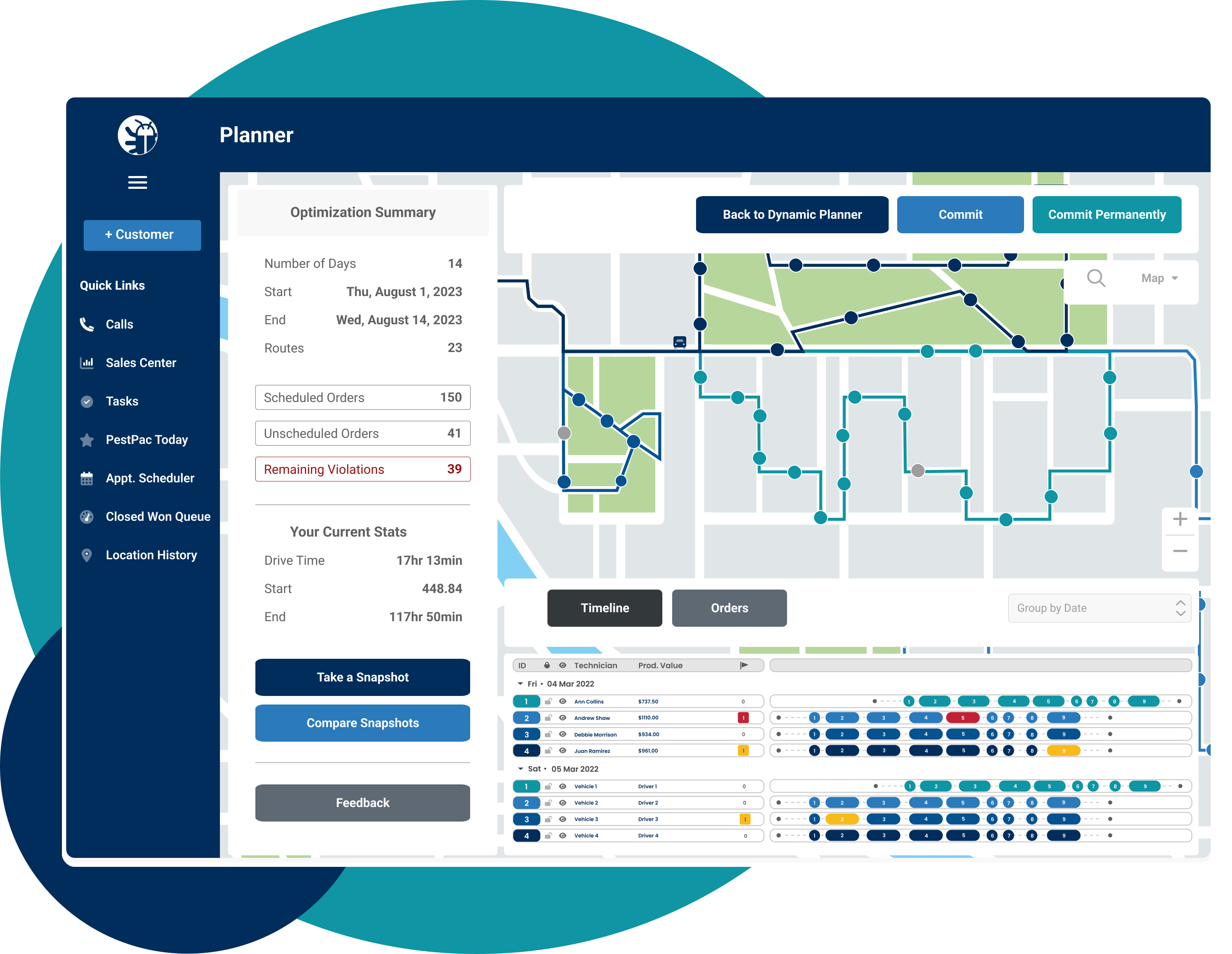
- RouteOp auto-optimizes an entire month of routes in minutes. PestPac's RouteOp evaluates every recurring appointment, technician territory and business rule at once, then generates the most efficient stop sequences across your full schedule, without manual replanning each cycle.
- Best Fit eliminates scheduling back-and-forth for inbound calls. When a new customer calls, Best Fit identifies the open slot that adds the least drive time to the nearest technician's existing route and books it instantly, keeping route density intact as the schedule grows.
- Operators using PestPac report fitting more jobs into each technician's day without extending hours. Tighter sequencing and smarter slot placement mean revenue-generating stops replace windshield time rather than adding to the end of the day.
The Visual Route Manager displays all of your appointments on a map so you can manually drag, lasso and reassign stops. Included with PestPac, it is ideal for smaller teams that want hands-on control and a clear visual picture of the day.
RouteOp adds an algorithm layer on top, auto-optimizing an entire month of routes based on your parameters. Rather than connecting dots on a map, the RouteOp algorithm evaluates traffic, weather and appointment times to put stops in the most efficient order, a scale of calculation no one can match by hand, given that a single technician's 10 daily appointments alone can be arranged roughly 3.7 million ways.
Best Fit, part of RouteOp, handles real-time single-appointment scheduling. When a customer calls, it finds the most efficient open slot to drop the new job into without unraveling the existing route, so your office can book inbound calls quickly and confidently.
Underpinning all three, PestPac honors your real business rules. Workday calendars define operating hours, breaks, days off and holidays, and RouteOp respects all of them. You can assign technician skill types such as termite license, wildlife trapping and spray rig, so a job is never routed to an unqualified technician, and customer-specific constraints like preferred days or time windows are supported. Completed routes flow to the pest control scheduling software and the PestPac mobile app, where technicians get job details, customer and service history, navigation, digital signatures and in-field payment capture. GPS-enabled dispatch shows technician locations in real time, and safety monitoring tracks speeding, hard turns and idling to help extend vehicle life. Because routing, scheduling, the CRM and billing all live on one platform, your data flows automatically instead of being re-keyed between disconnected systems.
How PestPac Compares to Briostack, FieldRoutes and ServiceTitan
PestPac competes with several pest control and field service platforms. The table below shows where it sits relative to the tools operators most often evaluate against it. For a full feature-by-feature breakdown, follow the comparison links.
For pest control businesses focused specifically on route efficiency at scale, PestPac is the strongest fit. RouteOp is purpose-built for the recurring, high-stop structure of pest control work, and Best Fit handles real-time scheduling in a way that general field service platforms do not match. Companies running 10 or more technicians with dense recurring route books see the clearest advantage.
The short version: many platforms can sequence stops on a map. PestPac is purpose-built for pest control, including the compliance and chemical-tracking depth the category demands, and connects routing to the rest of your operation, which is what turns route efficiency into sustained, scalable growth.
What Metrics Should You Track to Measure Route Efficiency?
Optimization is only worth doing if you can see the results. Track these KPIs from day one so you can prove the gains and keep tightening.
Tracking these metrics before and after implementing route optimization software gives the clearest picture of ROI, with jobs per day and miles per route typically showing the fastest movement.
How Do You Measure First-Time Fix Rate, and Why Does It Matter for Routing?
First-time fix rate is the share of jobs a technician completes fully on the first visit, calculated as first-visit resolutions divided by total jobs. It matters for routing because every return trip is an unplanned, unbillable drive that eats into capacity, so improving first-time fix through better technician preparation, the right skills matched to the job and complete job data in the field is route efficiency by another name.
What Does Revenue Per Technician Tell You About Route Efficiency?
Revenue per technician shows how much billable work each technician actually produces, which is the truest single read on whether your routes are working. When routes tighten and windshield time falls, each technician completes more jobs in the same paid hours, and revenue per technician rises without any change to your headcount or rates.
Rolling It Out: Implementation and the Road Ahead
How Do You Start Implementing Route Optimization in an Existing Operation?
Start with clean data and a phased rollout rather than flipping everything at once. Verify and geocode customer addresses, confirm service-time estimates and map your territories first, then run the software alongside your current process for a short period so you can compare results before cutting over fully. A pilot on one branch or a subset of routes is the lowest-risk way to prove the gains and build confidence.
How Do You Train Dispatchers and Technicians to Use Routing Software?
Train the two groups for the different jobs they do. Dispatchers need to learn how to set business rules, read the optimized plan and handle exceptions and emergency re-dispatch. Technicians mainly need the mobile app: navigation, job details and capturing signatures and payments. Keep early training focused on the features that remove each group's biggest daily frustration, since adoption follows demonstrated value. Many operators find buy-in comes quickly once technicians experience shorter days and less backtracking for themselves.
How Do You Ensure Data Quality Before Migrating to Routing Software?
Optimization is only as good as the data behind it. Before you migrate, clean your records: verify and geocode addresses, confirm property and account details, attach realistic service-time estimates to each job type and reconcile technician skills and certifications. Then keep that data current as part of normal operations rather than fixing it only when a route visibly fails.
How Will Predictive Scheduling and AI Change Pest Control Routing?
Looking ahead, routing is moving from reactive to predictive. Emerging capabilities include AI that forecasts traffic hours in advance, learns realistic service durations by job and property type, models technician efficiency patterns and anticipates seasonal demand so routes can be pre-built for peak periods. The practical takeaway is not to chase every buzzword but to choose a platform that is investing in this direction, so your routing keeps getting smarter as the technology matures.
How Can Routing Software Support Sustainability and Emissions Tracking?
Fewer miles driven is not only cheaper, it is greener. Because optimized routing reduces total mileage, it directly lowers fuel burned and emissions produced, and software that reports on mileage and fuel lets you quantify that reduction. As environmental expectations grow among customers and commercial accounts, the ability to show fewer miles and lower emissions per stop becomes both a reporting asset and a genuine selling point.
Real Results: Cowley's Pest Services
After implementing PestPac, Cowley's Pest Services reduced unproductive drive time and increased the number of jobs each technician completes per day, without adding staff or extending working hours.
When Cowley's Pest Services grew past 5,000 customers, planning the following month's routes by hand became one of the most time-consuming jobs in the business, taking into account thousands of customers' unique needs, a growing full-time workforce and the constant puzzle of assigning and sequencing jobs efficiently. The team was printing route sheets and grouping jobs on a paper map, and planning a single month's routes could eat up the better part of a few weeks.
After adopting PestPac RouteOp, the results were immediate. That multi-week planning process dropped to roughly one business day using PestPac's multi-day planner. Technicians stopped going into overtime and stopped working extra days, while still honoring customer requests and the level of service their customers expected. As Production Manager Jill Esposito put it, technicians now spend roughly 30 minutes to one hour of drive time per day, far less than before. In short, Cowley's was able to fit more jobs into the standard workday and serve more customers without adding strain to the team or the office.
Read the full Cowley's Pest Services case study
The takeaway applies well beyond one company: tighter routing is not only a cost saving, it is a growth engine, and the time it frees up in the office is often as valuable as the miles it saves in the field.
Conclusion and Next Steps
Inefficient routing is one of the few costs in a pest control business that you can cut without cutting service, headcount or quality. By grouping jobs geographically, building consistent territories, scheduling recurring customers on set days, building in buffer time and letting purpose-built software handle the heavy lifting, you can reclaim hours of windshield time, reduce fuel costs and fit more jobs into every day with the technicians and vans you already run.
The businesses that win at this treat routing as an ongoing, measured discipline rather than a one-time setup. Start with the steps above, track the KPIs that matter and refine week by week.
Ready to see what optimized routing could do for your business?
- Explore PestPac's pest control routing software
- Request a demo and see RouteOp build a month of optimized routes around your business rules
Frequently Asked Questions
What is pest control route optimization?
Pest control route optimization is the practice of sequencing and scheduling service stops so technicians drive the shortest sensible path, waste the least time and complete the most jobs in a day. It weighs travel distance, traffic, service time, technician skills and customer time windows all at once, rather than listing stops in the order they were booked.
What is the difference between route planning and route optimization?
Route planning decides which jobs happen and roughly when. Route optimization arranges those jobs in the single most efficient order and assignment. Planning can be done by hand for a small operation, but optimizing across many daily stops and recurring accounts effectively requires software.
What is windshield time?
Windshield time is the paid time technicians spend driving between jobs rather than performing them. It generates no revenue, so reducing it is the clearest goal of route optimization.
What is route density?
Route density is how tightly your accounts are packed within an area. Higher density means more jobs per square mile and less driving between them, which lowers costs and lets you absorb emergency calls more easily.
What is smart or dynamic routing?
Smart or dynamic routing uses an algorithm to build and adjust the optimal stop order automatically, factoring in traffic, weather, road closures and job priorities rather than just straight-line distance, and re-optimizing when conditions change.
How is route optimization software different from Google Maps?
A map app routes one driver between points. Routing software builds the entire day for every technician, accounting for technician licensing, recurring schedules, time windows and capacity that a map app cannot see, and connects to your scheduling and billing.
How much can route optimization reduce fuel costs?
Reductions of roughly 20 to 40 percent in fuel and mileage-related costs are commonly cited, depending on your current route density and geography.
How many more jobs per day can technicians complete?
Most operations add two or more jobs per technician per day after optimizing, with no new hires, which at scale can mean hundreds of additional appointments per month.
How do you manage emergency calls without disrupting planned routes?
Reserve a little buffer capacity each day, use tiered response protocols and dispatch the closest qualified technician. Routing software can slot an urgent call into the best technician's route in real time and re-optimize around it.
How often should you re-optimize routes?
Treat routing as ongoing. Compare planned versus actual drive time weekly and refine, since routes drift as customers come and go and seasons change.
What KPIs should pest control businesses track for route efficiency?
Track jobs per technician per day, drive time as a percentage of paid hours, first-time fix rate, on-time arrival rate, revenue per technician and overtime hours.
How does route optimization help a pest control business scale without adding headcount?
By raising the number of jobs each technician can complete in a day and building route density over time, optimization lets you serve more customers with the team and vehicles you already have, rather than hiring to keep up with growth.